How Can Computers Read Scanned Documents?
Have you ever scanned a document only to discover you couldn’t search for a word, copy a sentence, or quickly find the information you needed? That’s because scanned documents are often stored as images rather than readable text.
Optical Character Recognition (OCR) helps solve this problem by converting text in scanned documents, images, and PDFs into machine-readable text. This makes digital records easier to search, access, and use. For businesses managing large volumes of paperwork, OCR can improve document retrieval, support digital workflows, and make document management more efficient.
What Is Optical Character Recognition (OCR)?
Optical Character Recognition (OCR) is a technology that enables computers to recognize text within scanned documents and images. It converts letters and numbers into machine-readable text that can be searched, copied, and sometimes edited. Think of a scanned document as a photograph of a page. You can read the words, but your computer may not recognize them as text until OCR processes the image.
For example, a business with thousands of scanned invoices could use OCR to make vendor names and invoice numbers searchable, helping employees find specific records without opening every file. OCR is useful for digitizing paper records and improving access to business information. However, it doesn’t automatically organize documents, classify records, or verify every piece of information. Additional tools and records management processes may be needed.
How Does OCR Work?
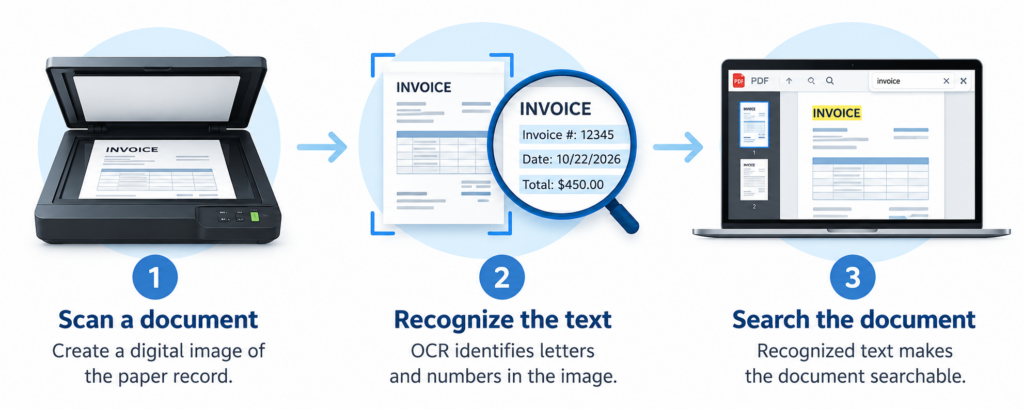
OCR analyzes a document image, recognizes its characters, and converts them into machine-readable text. The process generally involves three steps.
1. Scan or Upload the Document
The process begins with a scanned paper record, photograph, or image-based PDF. Clear, properly aligned images generally produce better results than blurry, faded, or damaged documents.
2. Recognize the Text
OCR software analyzes the image to identify letters, numbers, and other text. Some systems also recognize document layouts, including paragraphs, columns, and tables.
3. Convert the Text Into a Searchable Format
The recognized text can be embedded in a PDF, exported to another format, or made available to a document management system. Depending on the software, users can then search for specific words or phrases within the document.
For example, OCR can help an employee locate a particular clause in a scanned contract by searching for a company name, date, or phrase instead of manually reviewing every page. OCR accuracy varies, so important information should be reviewed when errors could have legal, financial, or operational consequences.
Why Are Scanned Documents Not Always Searchable?
Scanning a document creates a digital version of a paper page, but it doesn’t necessarily make the text searchable. The difference comes down to how the document is stored. When a document is scanned without OCR, the resulting file typically contains an image of the original page. You can see the words on your screen, but your computer may not recognize them as text. Searching for a name, date, account number, or phrase within the document may not work.
OCR addresses this limitation by recognizing the text in the image. Depending on the software and processing settings, that text can be embedded in the PDF or stored separately so the document’s contents can be searched.
Image-Based PDFs vs. Searchable PDFs
An image-based PDF displays a picture of each page. A searchable PDF contains machine-readable text that allows users to find specific words or phrases. Some searchable PDFs retain the original page image while adding a text layer, so readers can still see the document as it originally appeared.
For organizations managing large volumes of paper records, this distinction matters. OCR can make digitized documents easier to search and retrieve, but effective organization still requires practices such as consistent file naming, indexing, and metadata.
Common Uses of OCR
OCR helps organizations convert printed information into searchable digital text. When combined with appropriate software and document management practices, it can support several business applications.
Document Scanning and Digitization
OCR makes digitized paper records searchable, helping employees locate information in archived files without manually reviewing every page.
Invoices and Financial Documents
OCR can recognize information on invoices, receipts, and purchase orders. Depending on the software, this information can be extracted for use in accounting systems, reducing repetitive manual data entry.
Employee, Legal, and Business Records
OCR can make personnel files, contracts, applications, and other business records searchable. This helps authorized employees locate relevant information more efficiently. Organizations should maintain appropriate access controls, retention policies, and security safeguards when handling confidential or personally identifiable information.
Historical and Government Records
Libraries, government agencies, educational institutions, and businesses can use OCR to improve access to archived records. Faded text, aging paper, and older typefaces may affect recognition accuracy.
Benefits of OCR for Document Management
When integrated into a well-designed document management process, OCR offers several advantages:
- Faster document retrieval: Search recognized text to locate specific information more quickly.
- Reduced manual data entry: Recognize text from forms and invoices for use in other business systems.
- Improved information access: Help authorized employees find and use digital records when needed.
- More efficient workflows: Support document processing and data transfer when paired with appropriate automation tools.
- Better access to digitized archives: Make historical and long-term records easier to search.
OCR is most effective when combined with consistent indexing, metadata, quality checks, security controls, and records retention policies.
What Are the Limitations of OCR?
Although OCR can make scanned documents easier to search, it isn’t perfect. Accuracy depends on image quality, document layout, and the software being used.
- Poor image quality: Blurry scans, faded text, and damaged pages can lead to recognition errors.
- Handwriting and unusual fonts: OCR generally works best with clear, printed text. Handwriting and older typefaces can be more difficult to recognize.
- Complex layouts: Tables, multiple columns, and unusual formatting may affect reading order or layout preservation.
- Recognition errors: OCR may confuse similar-looking characters, potentially affecting names, dates, and account numbers.
- Limited context: Recognizing text doesn’t necessarily mean understanding its meaning or determining which category a document belongs in. Additional tools may be needed to extract specific fields, classify documents, validate information, or automate workflows. Organizations should also evaluate how OCR software handles sensitive information, including where documents are stored and who can access them. Appropriate privacy and security safeguards remain essential.
Request a Free Quote
Need secure document shredding, hard drive destruction, records management, or IT asset disposal services?
Boxes of records piling up? Old hard drives collecting dust? Let's take care of that.
Or, complete our short form and we'll respond within 24 hours.
Make Your Digital Documents Work Smarter
Optical Character Recognition can make scanned documents easier to search, access, and use. But getting the most from digitized records requires more than text recognition alone. Scanning quality, indexing, security, and retention policies all play important roles in effective document management.
If your organization is looking to improve access to paper records or build a more efficient digital records process, Rover can help you explore the right approach. Contact Rover to discuss your document management needs.
Frequently Asked Questions About OCR
What Does OCR Stand For?
OCR stands for Optical Character Recognition. It is a technology that recognizes text within scanned documents, images, and PDFs and converts it into machine-readable text.
What Is OCR Used For?
OCR is used to make scanned documents searchable, digitize paper records, recognize text on forms and invoices, and support document processing workflows.
Does OCR Make a PDF Searchable?
Yes. OCR can make an image-based PDF searchable by recognizing the text within its pages and making that text available for searching. Results depend on the software, document quality, and processing settings.
Is OCR 100% Accurate?
No. OCR can make mistakes when processing blurry scans, faded text, handwriting, unusual fonts, or complex layouts. Important information may need to be checked for accuracy.
What Is the Difference Between OCR and Document Scanning?
Document scanning creates a digital image of a paper document. OCR analyzes that image to recognize the text it contains. Combining scanning with OCR can produce searchable digital documents rather than image-only files.
Can OCR Recognize Handwriting?
Some OCR and handwriting recognition tools can process handwritten text, but accuracy varies. Clear printed text generally produces more reliable results than cursive handwriting or inconsistent letterforms.
Is OCR the Same as Artificial Intelligence (AI)?
No. OCR is a specific text recognition technology. Some OCR systems use AI techniques, while advanced document processing solutions may combine OCR with machine learning and natural language processing to extract and interpret information.
How Does OCR Help With Records Management?
OCR makes digitized records searchable, allowing employees to locate information more efficiently. When combined with indexing, metadata, access controls, and retention policies, it can support a more effective digital records management strategy.